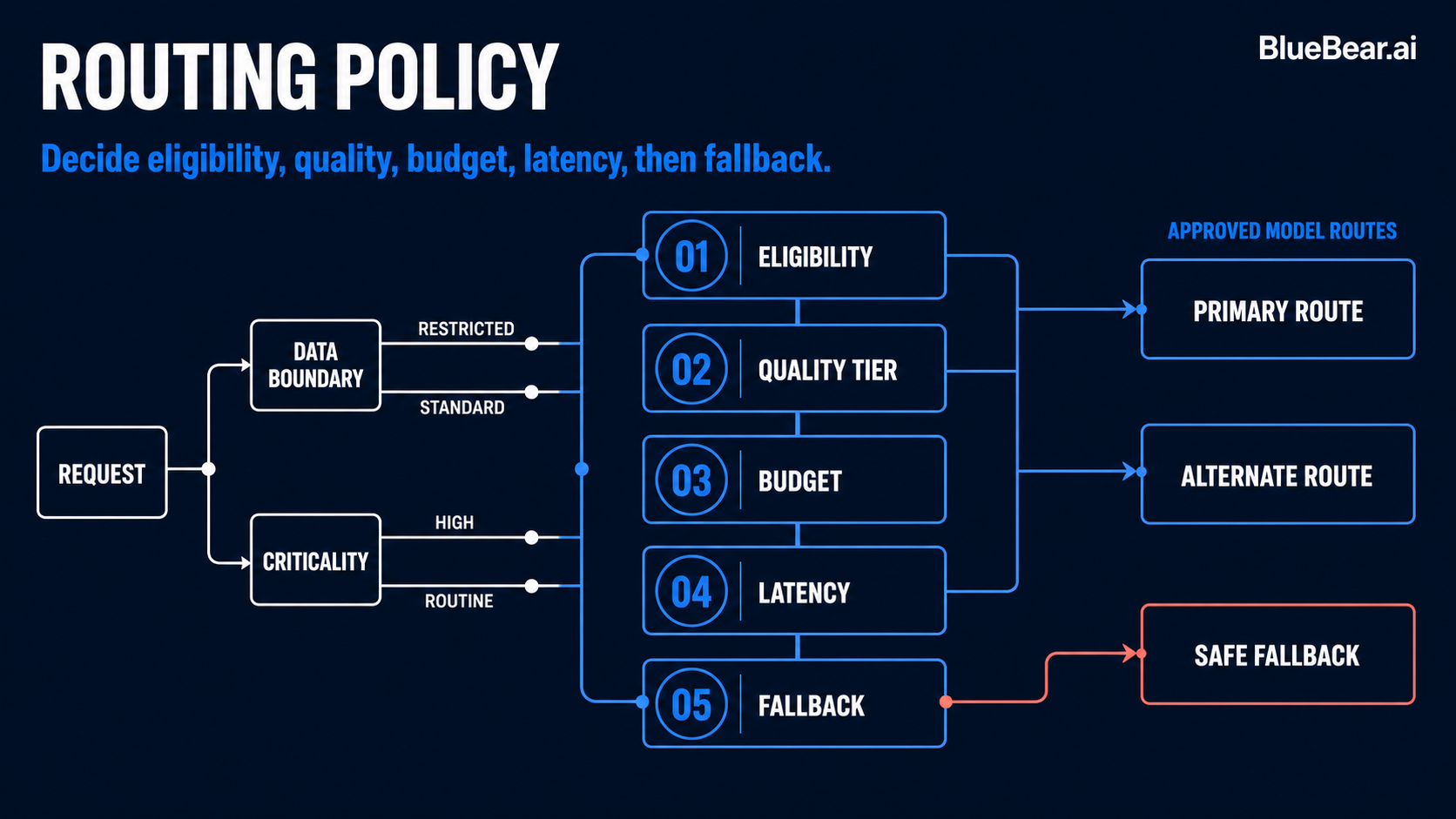
What changed: Updated 18 August 2026: added the outcome-record contract that a feedback loop depends on, and a correction about what feedback-driven routing does and does not do.
Client: Pix2Code · Partner: BlueBear · Business problem: Get more value from AI spending without lowering the quality of customer-facing work
If your AI bill is growing, the problem may be how work is assigned
Many businesses begin with one strong AI model connected to every workflow. It is simple, it works, and it helps the team move quickly. Then usage grows. More employees use AI, more customer experiences depend on it, and the monthly bill starts climbing.
The natural response is often to negotiate a lower price or switch to a cheaper model. But that misses the larger opportunity. The real question is: does every task need the same level of intelligence, speed, and cost?
Usually, it does not. Summarizing a short document is different from planning a complex project. Extracting a few structured fields is different from analyzing video frames. A routine background job should not automatically receive the same expensive model as a high-value, customer-facing decision.
Model routing is work assignment for AI
Think of model routing the way an operations leader thinks about assigning work to a team. You would not give every task to the most senior, expensive specialist. You would match the work to the person with the right skills, availability, speed, and cost.
BlueBear's software applies that operating principle to AI. For each request, it can consider:
- What kind of work is this? Planning, extraction, visual analysis, generation, coding, or a routine background task.
- What capabilities are required? For example, understanding images, handling a long history, using tools, or returning a precise format.
- What matters most here? Highest quality, fastest response, lower cost, or a deliberate balance.
- What has worked before? Which models produced outcomes that users accepted for similar work.
The goal is not to route everything to the cheapest model. It is to stop overpaying for routine work while protecting the tasks where quality has the greatest business value.
The Pix2Code example: one customer request contains several different jobs
Pix2Code provides AI-assisted creative and video-editing workflows. A request that looks like one action to the customer can contain several jobs behind the scenes: understanding the request, planning an edit, analyzing visual material, generating an asset, producing structured instructions, and applying changes.
Those jobs have different needs. Visual analysis requires a model that can understand images. Planning may need more context and stronger reasoning. Extracting a small set of fields may be predictable enough for a faster, lower-cost option.
BlueBear helped Pix2Code make those differences visible to the routing software. Instead of hard-coding one model everywhere, the workflow describes the job and its priorities. The routing layer can then recommend an appropriate model while keeping a record of why that recommendation was made.
How we built it without disrupting the existing workflow
Changing model selection can affect cost and customer experience, so BlueBear used an observation-first rollout. The routing software can make a recommendation in the background while Pix2Code's existing execution path continues to run.
This allows the team to compare the recommended model with the model that actually performed the work before handing over control. It also records when a fallback was needed. Operators gain evidence before making a policy change instead of betting production quality on an untested rule.
In practical terms, the rollout follows four stages:
- Describe the work: define the task, required capabilities, and business priority.
- Observe recommendations: see what the router would choose without changing the customer experience.
- Compare outcomes: connect each recommendation to quality, speed, cost, and user response.
- Apply proven policies: allow routing decisions to take control where the evidence supports them.
The part most routing systems miss: what happened afterward?
A routing decision is only useful if the business can tell whether it worked. BlueBear connected Pix2Code's model choices to the outcome of the creative work.
The software can learn from signals the product already creates:
- Did the output pass the product's quality checks?
- Did the user accept it, reject it, or keep correcting it?
- Which of two alternatives did the user prefer?
- What rating did the completed experience receive?
- How long did it take, how many tokens did it use, and was a fallback required?
This changes routing from a purchasing rule into an improvement loop. The system is not simply asking which model is cheapest. It is learning which model creates a successful result for a particular kind of work at an appropriate cost.
A simple way for operators to measure value
Cost per model call is easy to see, but it can be misleading. A cheap response that must be redone three times may cost more than a strong first result. A premium response used for a routine task may deliver no additional value.
A better operating measure is cost per successful outcome. Pair it with a small set of supporting measures:
- User acceptance and rework rate
- Time to a completed result
- Model cost and token use
- Fallback and failure rate
- Performance by task type, team, or customer workflow
This gives finance, operations, and product leaders a shared view. Finance can see where premium-model spend is justified. Product can protect quality. Operations can identify workflows that create rework or unnecessary waiting.
What BlueBear's software solves
The BlueBear approach gives operators control without asking them to become model experts. The software provides a consistent way to describe AI work, compare model choices safely, trace what actually ran, and feed business outcomes back into future decisions.
For Pix2Code, that means the foundation to:
- Use premium models where their capabilities create real value.
- Move suitable routine work to faster or more economical options.
- See the relationship between model choice and customer experience.
- Improve routing policy with evidence instead of vendor claims or guesswork.
- Keep feedback privacy-aware and avoid interrupting the creative workflow if reporting is unavailable.
We are not attaching an invented savings percentage to this case study. The meaningful outcome is that Pix2Code now has the measurement and control loop required to improve quality and AI economics over time.
Questions to ask about your own AI spending
- Are we using the same model for simple and complex work?
- Can we explain why a particular model handled a request?
- Do we know which model actually ran when a fallback occurred?
- Can we connect model cost to acceptance, rework, and completed outcomes?
- Can we test a new routing policy before it changes the customer experience?
If the answer to most of these is no, reducing the price of individual calls will only solve part of the problem. The higher-value move is to build a routing and feedback system around the work your business actually performs.
Ready to get more value from your AI budget?
BlueBear helps businesses turn growing AI usage into a governed, measurable operating capability. Talk with BlueBear about model routing for your workflows.
What a feedback loop actually needs, and one correction
A routing loop that learns from outcomes is only as good as the outcome record. This section sets out what that record contains in our implementation, and corrects a reading of "feedback-driven routing" that is easy to arrive at and wrong.
The correction: feedback does not re-run the model
When a user marks an answer useful or incorrect, our gateway maps that onto a quality status on the outcome record and delivers it to the planner. The retry machinery attached to it — exponential backoff from five seconds to a five-minute ceiling, over a bounded number of attempts — is delivery retry: re-sending a record to a system that was unreachable. Nothing is re-inferred and no model changes as a result of a single rating.
This matters because "the router learns from feedback" is easy to hear as "a thumbs-down reroutes your next request". It does not. Feedback becomes evidence in a dataset the planner uses; changing what executes is a separate, deliberate act, gated by an activation evaluation and rolled out behind a canary.
The record the loop runs on
Each routed request emits an outcome carrying, among other fields: the request and plan identifiers, the tenant, the selected model, the model that actually executed, the planning mode, whether a canary executed, whether execution succeeded, router confidence, a quality status, observed latency and cost, input and output tokens, whether the user regenerated, whether a tool call failed, and an explicit flag for whether the plan was honoured.
| Field | What it lets the loop learn | What its absence costs |
|---|---|---|
selectedModel and executedModel, held separately | Whether the recommendation was taken. | Every outcome is attributed to the planner whether or not the planner caused it. |
planHonoured with a reason | Which requests are legitimate evidence about the router's judgement. | Refusals are counted as acceptances, and the activation evaluation reads a population it did not cause. |
qualityStatus | Whether the result was accepted or degraded. | The loop optimises cost with no counterweight. |
userRegenerated | That the answer was inadequate, at no measurement cost. | A quality regression reads as a cost win on every dashboard. |
toolCallFailed | The failure mode that moves first after a model change. | Selection regressions hide behind retries until the invoice arrives. |
routePlanningMode and canaryExecuted | Whether a divergence was expected. | Shadow observations and real executions get blended into one number. |
Two of those do most of the work and are the ones most commonly absent elsewhere. userRegenerated is the cheapest quality signal that exists — the user is telling you the answer was inadequate, at no measurement cost. And the plan-honoured flag is what stops the loop learning from requests where its own advice was ignored: without it, a plan the caller declined for safety is indistinguishable from one it executed.
Being precise about what runs where
The gateway plans a route and records the plan; a runtime executes the model call. In active mode the recommendation does become the model the runtime is told to run, so it would be wrong to say plans are only ever recorded — and equally wrong to say the gateway performs the inference from a plan. The distinction is not pedantry: it determines who is accountable when a customer asks why a particular model handled their request.
Where to go deeper
- Shadow-mode routing — the stage before any of this changes what a user receives.
- Did your router honour the plan? — the field that keeps the feedback loop honest.
- Canary rollout for routing — how a routing change reaches production without a step change in risk.
- Is a cheaper model good enough? — the acceptance method behind any model substitution.
Questions people actually search for
- does model routing actually save money
It can, and the honest answer is that the size depends entirely on your traffic mix rather than on the models available. Routing pays where a large share of calls are doing work that does not need the strongest model — extraction, classification, routing, guardrails — and pays very little where most calls are open-ended generation. Measuring the mix first, in shadow mode, is much cheaper than assuming it.
- how does feedback improve model routing
By supplying an outcome the planner can learn from rather than a preference someone asserted. A rating becomes a quality status on a record that also carries the executed model, the cost, the latency and whether the plan was honoured. What it does not do is re-run the request or change the next one directly — that is a separate, gated decision.
- what is the difference between model routing and load balancing
Load balancing distributes equivalent work across interchangeable capacity. Model routing chooses between options that are not equivalent — different capability, different price, different failure modes — so it needs an eligibility boundary and a quality signal that load balancing does not. Treating models as interchangeable capacity is how a cost optimisation becomes a quality incident.
- how long before model routing pays off
Budget the evaluation before the saving. Shadow mode needs to run long enough that the task mix in the dataset resembles a full billing period, then the quality gate on the highest-value step, then a canary. Any timeline that skips the middle stage is describing a rollout where the first real test of the router's judgement is full production traffic.