The problem
Monday morning. Three faxed orders are unsigned. One visit note is dated too early to count. Two items need a payer approval that nobody has started. Your intake lead is on the phone with a doctor's office for the third time this week, and it is not yet ten o'clock.
You run a durable medical equipment business. Referrals arrive by fax, portal and email. Each one is for an item with its own billing code and its own payer rules. Someone opens it, works out which rules apply, and then chases what is missing.
The orders sit. The patient waits for a walker, a bed or oxygen. And the worst part lands weeks later: a denial for something a careful eye would have caught on day one.
Why this keeps happening
Every payer has its own list of what it needs for each item, and the lists change. Medicare says its prior authorization programs do not add new paperwork. They move the check earlier:
"They require the same information that is currently necessary to support Medicare payment, just earlier in the process."
Centers for Medicare & Medicaid Services, Prior Authorization and Pre-Claim Review Initiatives
The list is still growing. On July 30, 2026, CMS announced eight more item codes that will need prior authorization, effective October 28, 2026.
Most intake teams also check too late. They find out what is missing when they build the order, not when the referral lands. Then they chase one item at a time: a request today, another on Thursday, an approval next week.
| What goes wrong | What it costs you |
|---|---|
| Unsigned order found on day three | Three days of delay, one more call, a frustrated patient |
| Visit note that does not support the item | An order you cannot bill, or a denial after delivery |
| Prior authorization started late | Weeks of waiting, and the patient may go elsewhere |
| Denial after delivery | Equipment out the door, appeal time, and often a write-off |
How to fix it
You can cut most of the delay this month without buying anything. The fix is a checklist and a habit.
- Write one page per item. For your top ten items, list what each major payer needs: the order, the visit note, the diagnosis and any approval. Date each page.
- Check on arrival, not at order entry. The day a referral lands, someone ticks it against the page.
- Ask for everything at once. Send one message to the prescriber's office listing every missing item and why.
- Start approvals the same day. If the item needs prior authorization, open the request before the rest of the paperwork is complete.
- Track repeat gaps. Note which offices keep missing the same things, and call their staff once.
- Name one owner for the pages, who updates them when payer rules change.
- Only then look at software, when the arrival check takes more hours than you have.
Your trade group backs checks like these. On September 2, 2026, after CMS ended a pause on new supplier enrollments, AAHomecare's Tom Ryan said technology-driven safeguards can "keep bad actors out without punishing legitimate suppliers."
| Ask any vendor | A good answer sounds like |
|---|---|
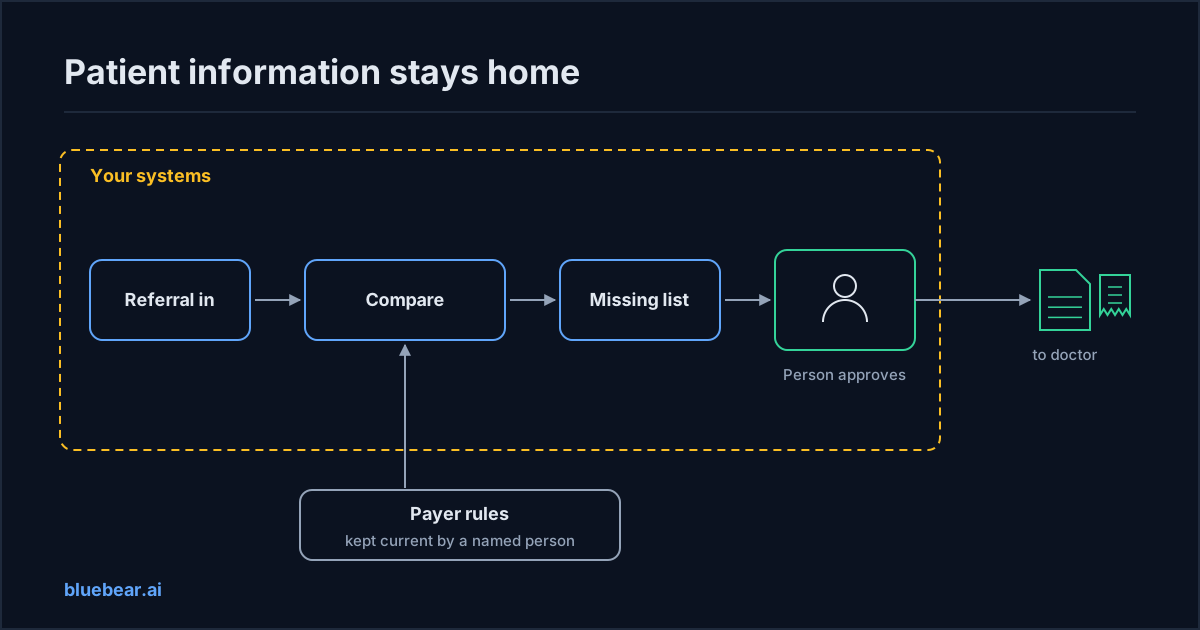
| Where does patient information go? | It stays in your billing system. We read it there and keep no copy. |
| Who sends the follow-up to the doctor? | Nobody, until a person on your team approves it. |
| Does it submit orders or claims? | No. Your billing staff still submit them. |
| Who keeps the payer rules current? | A person with DME experience, with the date of the last review. |
| Will you enter a business associate agreement? | A clear yes, before any patient information is shared. |
| How do I leave? | You switch off our access yourself and keep your records. |
What BlueBear does to help
BlueBear runs AI workflows for businesses and the agencies that serve them. BlueBear Access looks at an order and works out which documents, signatures and authorisations it still needs before it can move. We set it up around your payer and product rules in a pilot. See BlueBear Access for DME or request a demo.
If your agency or IT partner builds an intake check on BlueBear, a few things work today. A workflow can pause so a person on your team approves a message before it goes out. Every run leaves a record of what was checked and what came back. And connections to your systems are held by the platform, not handed to the AI.
Anything that touches patient information still needs a business associate agreement in place first. Ask about it before you share any data with anyone, including us.
What to do next
Write the first one-page checklist this week, for your highest-volume item and your biggest payer. When you start looking at vendors, bring these seven vendor questions. For the cases software cannot sort, how healthcare teams handle flagged cases shows how to keep that queue manageable.
Want to talk through an intake workflow for your business? Get in touch.
Questions people actually search for
- why do dme orders get stuck on paperwork
Because the check for what is missing usually happens at order entry, days after the referral arrived. By then the prescriber's office has moved on, and each missing item takes another call. Checking every referral on the day it lands, against a list for that item and payer, removes most of the delay.
- can software check dme referrals for missing documents
Yes, comparing what arrived with what a payer needs is a good job for software. The harder questions are where patient information goes, who keeps the payer rules current, and whether a person on your team approves anything before it is sent.
- does dme order automation send patient data outside
It depends on the vendor, so ask. Some tools copy patient information to their own systems, and some read it where it already lives. Any vendor that handles patient information for you needs a business associate agreement before you share anything.
- who approves what gets sent to the doctor
A person on your team should. Software can draft the request to the prescriber's office, but a staff member should review it and send it. That keeps mistakes from reaching a doctor's office in your company's name.