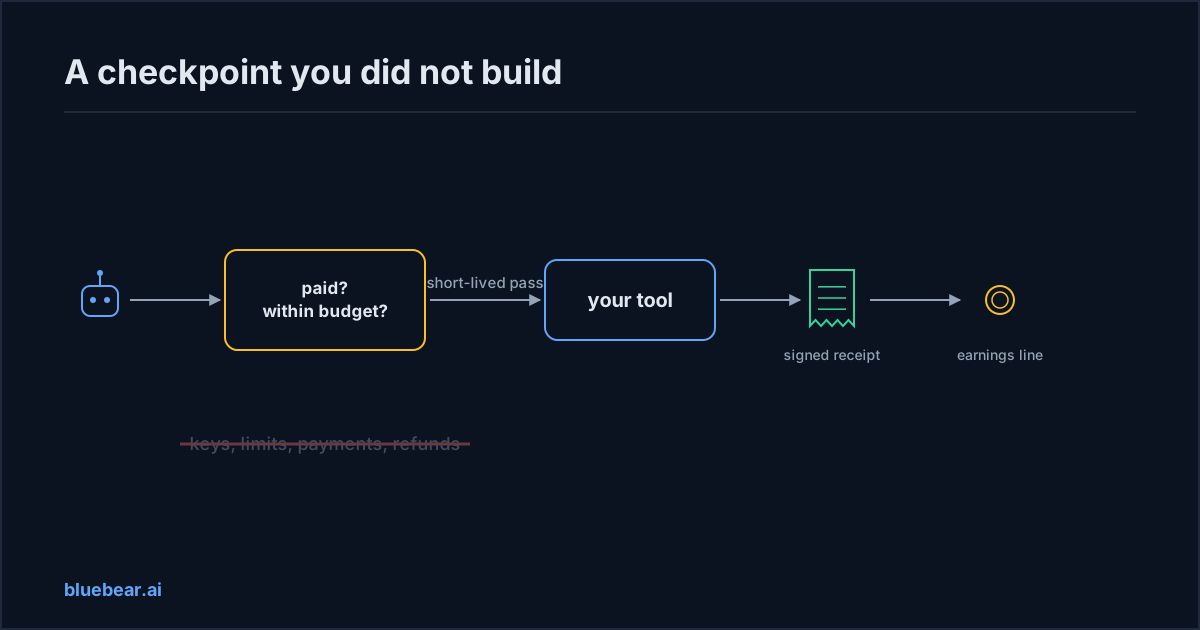
You can charge AI helpers for your tool without building billing by putting a paid-access checkpoint in front of it. The checkpoint decides whether the caller has paid, counts each use, charges the buyer, issues a signed receipt and records what you are owed. Your tool only has to accept calls that come through it.
The problem
You run a small software company. Your tool checks shipping addresses against carrier rules, and AI helpers at logistics firms have started calling it all day. You want to charge for that. You asked your developer what it would take.
The answer was a list, not a number. Keys for each customer, and a way to cancel them. Usage limits. A payment system. Receipts. Refunds when a call fails. Something to stop one customer from scraping the whole database. Tax. Six to eight weeks, maybe more, and none of it is the product your customers actually want.
So you searched "how to monetize mcp server" and "monetize your mcp server in 2026". Every guide started with "set up Stripe" and ended with you still building the rest. Meanwhile the free calls keep coming, and every one of them costs you money.
You are not doing it wrong. Charging by use has always meant building a small payments business on the side, and Cloudflare said so when it launched its own answer in July 2026.
"Historically, usage-based billing was difficult to implement. Businesses needed to effectively become payments companies, running their own accounting to track internal usage in a robust and auditable way."
Why this keeps happening
Most tools that AI helpers call speak MCP, a standard way for AI helpers to use tools. The standard says how a helper calls a tool. It says nothing about who paid. So every owner who wants a paid mcp server ends up rebuilding the same plumbing. The guides call it mcp billing and mcp metering, which just means counting use and charging for it. Here is what that plumbing looks like, and what breaks first.
| What you would have to build | What it takes | What goes wrong first |
|---|---|---|
| Keys for each buyer | Issue, store safely, rotate, cancel, scope to one buyer | A key leaks into a shared settings file and you cannot tell whose it was |
| Usage limits | A counter per key that survives restarts and bursts | A helper stuck in a retry loop burns a buyer's limit and they blame you |
| Payment | Customer records, metered prices, invoices, failed-payment handling | Use reported after the fact drifts from what you actually served |
| Receipts | A record per job both sides can check, tied to the charge | A dispute becomes your logs against their memory |
| Refunds | A rule for when a job was not delivered, and the reversal in two systems | Partial refunds and retried calls get counted twice |
| Abuse controls | Odd-pattern alerts, output caps, per-buyer budgets, a way to cut someone off | One buyer pulls your entire data set through the tool |
| Tax and payout | Rules by location, invoices, your own books | You learn the rules after the first sale |
Stripe's own launch post for machine payments, in March 2026, lists what a helper cannot do on its own today. Open an account. Read a pricing page. Pick a plan. Enter card details. Set up billing. Those are the steps a checkpoint has to replace.
None of this is your product. All of it stands between your tool and its first dollar. And every piece has to work before a buyer trusts your count enough to let their helper spend against it. That is why most mcp monetization advice stalls at the same place: the owner runs out of weeks before the plumbing is done.
How to fix it
- Separate the product from the plumbing. Write two lists. What your tool does, and what it takes to charge for it. Only build the first list.
- Refuse to hand out keys. A key that lives in a buyer's settings file will leak. Insist on a model where each request carries a short-lived pass that expires on its own.
- Put one checkpoint in front of the tool. The checkpoint checks payment and budget, counts the use, and passes the call through. Your tool accepts calls only from the checkpoint. A direct back door defeats the whole point.
- Decide what a receipt says before you sell anything. What ran, for whom, at what price, what came back. This is what a refund is judged against.
- Keep paying and connecting apart. Paying to use your tool is one decision. Letting your tool reach into the buyer's own systems is a separate decision that belongs to the buyer. Never mix them into one install.
- Pick who runs the checkpoint. You can build one, use a payment company's guidance, or use a marketplace that provides it. The table below compares the options.
Here is how the choices compare as of September 2026.
| Approach | How it charges | What the buyer needs | What you still build |
|---|---|---|---|
| Stripe's guide (monetize mcp server with stripe) | An experimental recipe for one-time purchases, where each request carries a payment; not metered billing | A funded wallet or a shared payment pass the helper can spend | Access checks, limits, receipts, refunds and abuse controls; Stripe's own sample says to add these yourself |
| Pay-per-request rails (x402) | Each request carries a payment; your tool checks it and serves | A funded wallet the helper can spend from | Receipts beyond the payment, refunds, any access that outlives one request |
| Per-event store (Apify) | You define billable events; the store counts and pays you 80 percent less platform costs | A store account and prepaid use | Packaging your tool for the store; no billing |
| Marketplace with a paid-access checkpoint (BlueBear's model) | Checkpoint checks payment and budget, counts, issues a signed receipt, records your earning | Credits in an account and a spending limit; no key to your tool | Accept only checkpoint traffic; no billing |
Payment rails solve "pay for this request". For a one-off public call that is enough, and the rail advocates are right that no account is needed. They do not solve "may this buyer use this version under this budget, and what did they get". That second question is where disputes live. A rail and a checkpoint are not rivals. A rail can settle what a checkpoint approved.
What BlueBear's marketplace does about it
BlueBear's marketplace is the checkpoint. A buyer pays in credits, one credit is one US dollar, and sets a spending limit for their helper. The helper finds your tool, reads the price, and buys access within that limit. Above the limit it stops and asks a person.
Each use is counted and produces a signed receipt: what ran, for whom, at what price, and what came back. Your earnings are recorded from the receipts, one line per job, and the lines are never edited. If a buyer rejects a result under your stated refund rule, the job is refunded and a new line reverses your earning. Your tool's only billing job is to accept calls that come through the checkpoint with a short-lived pass.
Nobody holds a permanent key. The buyer never gets one to your tool. You never get their passwords. If your tool needs their systems, they grant narrow access from their side and can switch it off without cancelling the purchase. Access to your tool can be switched off the same way.
What is still early. The marketplace is a pilot. Publishing is by invitation, and BlueBear sets up each listing on your behalf. Payouts are done by hand, there is no automatic transfer to your bank, no tax handling and no ranking. The part where a helper connects and buys on its own has been proven during the pilot, not opened to everyone.
What you give up: the platform's cut of each sale, and the ability to sell the same tool outside the checkpoint, because a back door defeats the count. What you keep: your code, your data, your price, and your own keys to whatever sits behind your tool.
What to do next
Take your developer's list and cross off everything that is billing. What remains is your product. Then write the one-sentence receipt and the refund rule from step four, because you will need both whichever checkpoint you choose.
Three pieces in the BlueBear library explain the buyer's side. Why passing a buyer's credentials through your tool fails a security review covers the one mistake to avoid. How buyers keep access narrow shows what they will grant your tool and what they will not. How buyers set spending rules for their helpers tells you the limits your price has to fit inside.
If your price is not settled, read what a fair price looks like first. If it is, what BlueBear needs from you to list your tool is the next step. The public marketplace page shows what a paid listing looks like to a buyer.
Questions people actually search for
- how do i monetize my mcp server
Put a paid-access checkpoint in front of it. The checkpoint decides whether the caller has paid, counts each use, charges the buyer from prepaid credits, issues a signed receipt and records what you are owed. Your tool only accepts calls that arrive through the checkpoint with a short-lived pass. You never store a card, issue a key or write refund code. That is the whole model behind a paid mcp server. On BlueBear, payouts are still made by hand during the pilot.
- do buyers need a key to use a paid tool
Not in this model. The buyer pays for the right to use your tool. Their AI helper then gets a short-lived pass for each request, tied to that buyer, your tool's version, the allowed action, a usage limit and an expiry time. Nobody pastes a key into a settings file, and you never issue one you would later have to cancel. If your tool needs to reach the buyer's own systems, the buyer grants narrow, revocable access from their side instead of handing you a password.
- what would i have to build to bill per use
Seven things, none of which are your product. Keys that can be issued, stored safely and cancelled. Usage limits per buyer that survive a restart. A payment system with customers, metered prices and failed-payment handling. A receipt per job that both sides can check. Refund rules and the reversal in both your ledger and the payment system. Abuse controls so one buyer cannot scrape your whole data set. Tax and payout handling. Every piece must work before a buyer will trust your count.
- can i use stripe to charge for my tool
Partly. As of September 2026 Stripe's guide is an experimental recipe for one-time purchases, where each request carries a payment. It is not metered billing. Its own sample tells you to add access checks and limits yourself. Stripe also does not decide who may call, record a receipt per job, handle refunds when a result is rejected, or stop abuse. Those pieces are still yours to build. A marketplace with a paid-access checkpoint bundles them, and a payment rail can still settle what the checkpoint approved.