The problem
You own a plumbing and HVAC company with 40 trucks. Over two years you have tried four AI tools. One books jobs from voicemail. One chases unpaid invoices. One writes up estimates. One you dropped in March because it kept double-booking.
Every one of them asked for the same thing on day one. A login to your dispatch system. A login to your accounting software. "Just connect it and we handle the rest."
In June your office manager notices something. The tool you dropped in March still has a working login to your dispatch system. Nobody turned it off, because nobody knew where the switch was. The vendor's support line says to email them.
That is the problem. Every AI vendor wants a login to your systems, and once they have it, you cannot switch it off. You handed out keys to your building and you do not have a list of who holds one.
The biggest software companies now say the same thing about their own AI helpers.
"That's why it's critical to track agent identities, manage their lifecycle and permissions, and carefully secure their access to your organization's resources."
Alex Simons, Microsoft, Announcing Microsoft Entra Agent ID (May 2025)
Why this keeps happening
Most AI tools connect to your systems the same way phone apps do. You click "allow", and the vendor receives a long-lived pass to your account. The pass sits in the vendor's database. It usually covers more than the job needs, because the vendor asked for everything once rather than asking twice. And it lasts until someone remembers to revoke it, in a settings page inside the system it opens.
That was tolerable when you had two software vendors. AI helpers make it worse in three ways. They touch more systems. They act more often. And they act on behalf of more people, with nobody watching each step.
Two decisions get mixed together in that "allow" click. Paying for the service is one decision. Letting it into your systems is another. When they are fused, you cannot stop the access without also stopping the service, and you cannot try the service without opening the door first.
| What you end up with | What it costs you |
|---|---|
| Vendor logins you cannot list | You fail the "who has access" question from your insurer or a big customer |
| Passes broader than the job | A voicemail tool that can also delete invoices |
| Access that outlives the contract | An open door to your books, months after you stopped paying |
| No record of what was touched | When data changes, you cannot say which tool did it |
| One switch for pay and access | You keep a mediocre tool because turning it off is a project |
Security people call the fix least privilege for ai agents: each helper gets only the access its job needs, for only as long as it needs it. You do not need the term. You need the list and the switch.
The security group OWASP describes what happens without them. As of December 2025, its guide to AI agent risks gives this example. A buying agent checks its approval at the start of a task. Hours later the spending limit is cut, but the agent still holds the old pass and completes the purchase anyway. A pass that expires is the only fix.
"Without a distinct, governed identity of its own, an agent operates in an attribution gap that makes enforcing true least privilege impossible."
OWASP GenAI Security Project, OWASP Top 10 for Agentic Applications for 2026 (December 2025)
In plain words: if you cannot say which tool did a thing, you cannot limit what that tool may do.
How to fix it
You can do most of this in a week, with the tools you already have.
- Make the list. One page. Every AI tool, every system it can reach, and what it is allowed to do there. If you cannot fill in a row, that is your first finding.
- Ask each vendor for the exact actions, not "an integration". Read jobs, yes. Create jobs, yes. Delete anything, no. Send emails to customers, only after a person approves. The least-privilege guide shows what a good list looks like.
- Find the off switch for every row, today. Not in a support ticket. In a screen you can open. If there is no switch you control, write that down too.
- Turn off everything that is not in use. Start with the tool you dropped in March.
- Decide where a person must approve. Reading your calendar needs no approval. Sending a customer an invoice does. The guide to human approval for AI helpers explains why one "yes" at setup is not enough for actions you cannot undo.
- Repeat the list every quarter. Fifteen minutes. Access grows quietly, and the list is the only thing that shows it.
Engineers call all of this ai agent authorization, and human approval for ai agents is the part where you decide which actions need a person. If you want the policy version for your IT team, the authorization policy guide lays it out.
What BlueBear's marketplace does about it
BlueBear's marketplace keeps the list and the switch on your side, not the vendor's. The marketplace is a pilot today, with invite-only publishing, and BlueBear lists each service on the seller's behalf. Here is what it does for you.
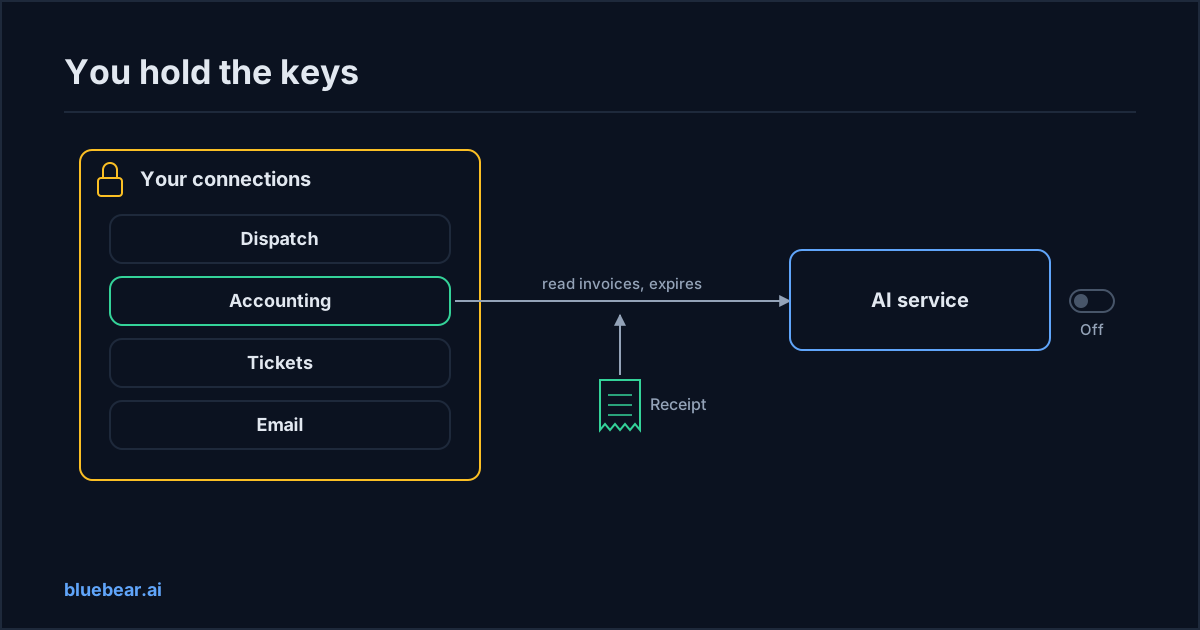
You connect each system once, and you keep the key. Your dispatch system, your accounting software, your ticketing tool. Each is connected once, and the login is stored locked away on the platform. Sellers never receive it. This store is your connection wallet: your list of what each seller is allowed to reach in your systems.
Each service borrows access, narrowly, and only with your say-so. When a service needs your accounting software, it does not get a new login. It asks to borrow the one you already connected, for a short list of named actions, such as "read invoices". You approve that specific loan. A previous loan to another service never counts as permission.
The seller holds a pass that expires, never a key. A service gets a short-lived pass that carries the borrowed access. When you switch off the loan, the next pass is simply not issued. There is no long-lived key in the vendor's database to chase down.
Paying and access are two switches. You can cancel a service and keep the connection for other uses. You can cut off a service's access to one system and keep paying for the service. Neither needs a support ticket.
Some services need nothing of yours. A permit lookup reads public records. Some sellers bring their own data under their own licence. Either way, you connect nothing.
A receipt for every job, kept with your other records. Each time a service uses borrowed access, the receipt records which loan was used, what action ran, on whose behalf, and what it cost. If you already keep an audit trail for your AI helpers, that receipt is one more entry in it, and it is signed so it cannot be edited later.
If you already run Microsoft's identity tools, keep using them for your own staff and your own in-house helpers. The wallet covers a different case: services sold by outside sellers, which your company directory never sees.
What is manual during the pilot: some systems cannot yet be connected through a standard sign-in. For those, the pilot team handles your access request by hand rather than pretending it is automatic. There is no league table of services and sellers are paid by hand. If a system you rely on is not connectable yet, ask before you buy.
What to do next
Make the one-page list this week. Every AI tool, every system it reaches, every action it may take, and where the off switch is. Then turn off the rows nobody is using.
When you look at a marketplace service, ask three questions before anything else. Which of my systems does it want? Which actions? Which of those need a person to approve? The vendor checklist for marketplace services turns those into a full review. To see how services state their access needs today, open the public marketplace.
Questions people actually search for
- how do i stop an ai vendor from keeping access
Find the off switch before you sign, not after. Ask where you can revoke access yourself, in a screen you control, without a support ticket. Prefer tools where the vendor never holds your login at all and only borrows access that expires. On BlueBear's marketplace you connect each system once, keep the key, and switch off any service's loan of it in one place.
- what is a connection wallet in plain terms
It is your list of what each seller is allowed to reach in your systems, kept on your side. You connect your dispatch, accounting or ticketing system once, and the login stays locked away. When a service needs one of those systems, it borrows access for a few named actions and a short time. You approve each loan, you can switch it off, and no seller ever holds your key.
- which ai actions should a person approve first
Anything you cannot easily undo. Reading a calendar or looking up an invoice needs no approval beyond the initial access. Sending a customer an email, submitting an order, changing a price or deleting a record should wait for a named person to say yes. Decide this per action when you grant access, and make sure the receipt for each job shows whether approval happened.
- do ai marketplace sellers get my passwords
On BlueBear's marketplace, no. A seller receives a short-lived pass that carries borrowed access to specific actions, never your password or a reusable login. When you switch off the loan, the next pass is not issued. Some services need nothing of yours at all, because they read public data or bring their own licensed data. Where a system cannot be connected yet, the pilot team handles the request by hand.