Disclosure: BlueBear builds an AI agent platform and an MCP gateway, so we have a commercial interest in this topic. n8n is a tool we think highly of; nothing below is a measurement of an n8n deployment we do not operate, and any arithmetic is illustrative.
The short answer: your agent node is probably running once per item, not once per run
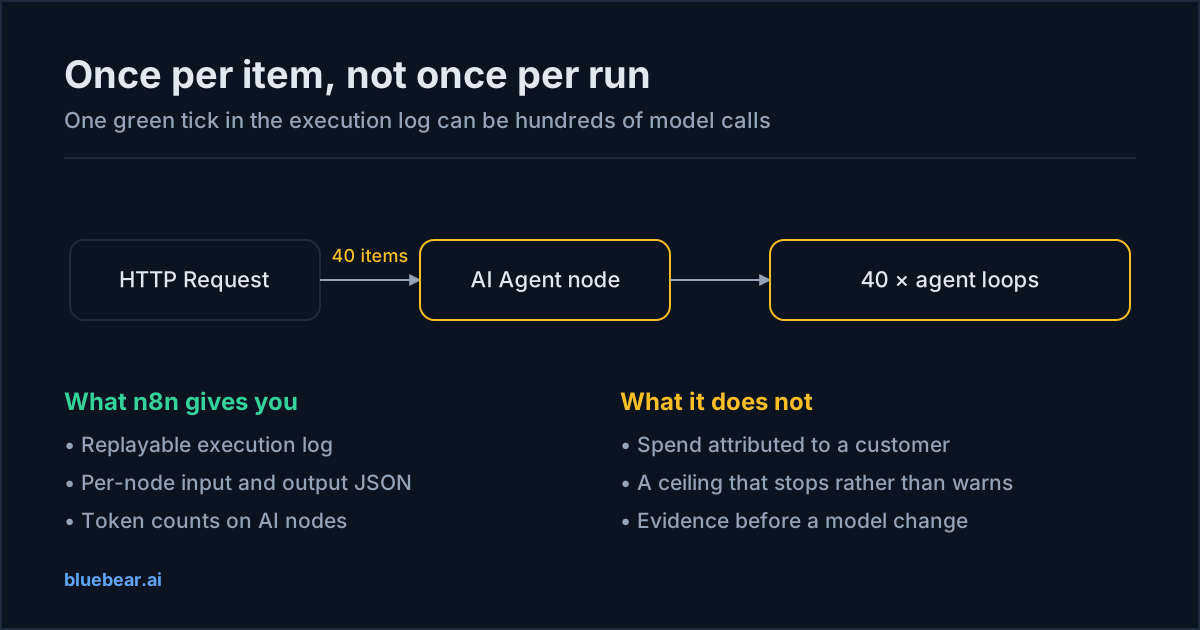
If an n8n workflow's model spend jumped without the workflow changing, the first thing to check is not the model — it is the item count. n8n nodes execute once for every item they receive. An HTTP Request node that returns 40 records, a Split Out node, a Google Sheets read, or a webhook batch all hand the downstream AI Agent node an array, and the agent runs the full loop for each element. One execution in the log can be several hundred model calls, and the execution list shows it as a single green tick.
This is not a defect. It is the item-based execution model that makes n8n good at what it does, and it is documented behaviour. It just means the mental model most people bring from a chat app — one run, one answer, one charge — does not survive contact with a workflow engine.
Open the last expensive execution, click the AI Agent node, and read the input item count. Multiply it by the number of model calls the agent made per item (planning turn, each tool-calling turn, final answer). That number, not the model's price per million tokens, is what changed.
What n8n already does well, and where cost leaks anyway
n8n is a genuinely good place to run agent workflows. The visual execution log is better forensic evidence than most code-based frameworks produce by default: you can open any past run, see exactly which node fired, inspect the input and output JSON of every step, and pin data to replay it. That makes cost debugging tractable in a way that reading application logs is not. LangChain-based AI nodes surface token counts on the node itself.
The leaks are structural rather than a failing of the tool:
| Leak | What it looks like in the execution log | First fix |
|---|---|---|
| Per-item agent invocation | The AI Agent node shows an input item count in the tens or hundreds. | Aggregate before the agent, or move the loop inside one prompt where the task allows a batch. |
| Unbounded agent iterations | A single item produces many sequential tool calls before an answer. | Set maxIterations on the agent. An agent that needs twelve turns usually has a tool-description problem, not a reasoning problem. |
| Memory nodes that only grow | Input token counts climb run over run for the same task. | Use a windowed buffer rather than full conversation memory. Most workflow agents do not need turn 1 at turn 40. |
| Sub-workflows re-sending context | The same document text appears in the input of three different nodes. | Pass an identifier between sub-workflows and re-read the payload where it is needed, rather than threading the whole body through. |
| Error-branch retries | Executions with status success that contain two agent runs. | Retries are correct behaviour — but they must be counted. A workflow with a 20% retry rate costs 20% more than its per-call price implies. |
| The model doing deterministic work | An agent call whose output is always the same shape and always derivable from the input. | A Code node, a Switch, or a regex. This is the single largest and most commonly ignored saving. |
Three changes, in the order that pays
1. Put an IF node in front of the model
In most production n8n workflows, a meaningful share of items do not need a model at all. The record already has the field. The status is already known. The document is a known template. Route those with a Switch or IF node and the agent never sees them. This is the cheapest possible optimisation because it removes calls rather than making them cheaper, and it does not require an evaluation at all — a deterministic branch either matches or it does not.
2. Cap the loop, then cap the agent
Set an explicit batch size on Loop Over Items and an explicit maxIterations on the agent. Both are ceilings, not optimisations: they turn an unbounded worst case into a bounded one. The value of a ceiling is that a bad input, a malformed tool response, or a model that has started arguing with itself costs a known amount instead of running until someone notices the invoice.
3. Split the workflow by model tier
Most n8n agent workflows have one model node doing extraction, routing, and final response. Those are different jobs with different failure costs. Extraction and classification are where cheaper models hold up best; the final customer-facing response is where they hold up worst. Splitting them into separate nodes lets you change one without re-testing the other. Which agent steps actually need a frontier model covers where the line falls.
What n8n cannot give you, and what to put in front of it
Three things are genuinely outside n8n's remit, and if you need them you need something between n8n and the provider:
- Spend attributed to a customer. n8n knows which workflow ran. It does not know that execution 88214 was work you are billing Acme for. If you run client work, that mapping is the difference between knowing your costs and knowing your margins — see white-label unit economics.
- A hard ceiling. A budget that stops spend rather than emailing about it has to sit where the key sits.
- Evidence for a model change before you make it. Duplicating a workflow to A/B a model works, but it doubles your spend during the test and only covers the traffic you replay. Evaluating a route plan against real production traffic without executing it is a different technique — shadow-mode routing.
BlueBear's gateway exposes an OpenAI-compatible /chat/completions endpoint, so pointing an n8n OpenAI credential at it is a base-URL change rather than a rebuild. What the gateway adds is bookkeeping and policy — attribution, catalog eligibility, budget state, and a route plan recorded alongside each request. It is worth being precise about the division of labour: the gateway plans and records; n8n still executes the workflow and n8n still decides what to call. Anyone telling you a gateway will silently reroute your production traffic to a cheaper model is describing a much riskier product than the one you want in front of a customer-facing workflow.
Do this next
Open your three most-executed workflows in n8n. For each AI Agent node, write down the input item count on the last run and the number of model calls that node made. That single table usually explains the bill, and it takes about ten minutes. Then work through how to find your most expensive LLM calls to turn it into a ranked list.
Questions people actually search for
- why is my n8n AI agent so expensive
Almost always because the AI Agent node is running once per item rather than once per execution. n8n nodes receive an array of items and execute for each one, so a Split Out or an HTTP node returning 200 records turns a single workflow run into 200 agent invocations — each one carrying its own system prompt, tool schemas, and memory. Check the execution log for the node's item count before you look at anything else.
- does n8n show token usage per workflow
n8n surfaces token counts on LangChain-based AI nodes in the execution view, so you can inspect a single run. What it does not give you by default is a rolling total per workflow, per customer, or per month — the execution log is a per-run record, not a ledger. If you need spend attributed to a customer or a workflow over time, you need to record it outside the execution history before n8n prunes it.
- should I use a cheaper model in n8n
Yes, for the steps that are extraction, classification, or formatting — and only after you have measured completion on your own data. n8n makes this unusually easy to test because you can duplicate a workflow, swap the model node, and run both against the same pinned input data. See Is a cheaper model good enough? for the acceptance method.
- how do I limit AI spend in n8n
n8n itself has no spend ceiling. The controls available inside n8n are structural: cap the agent's
maxIterations, cap loop batch sizes, and gate the AI branch behind an IF node so cheap deterministic cases never reach a model. A hard monetary ceiling has to live wherever the API key lives — at the provider, or at a gateway in front of the provider.