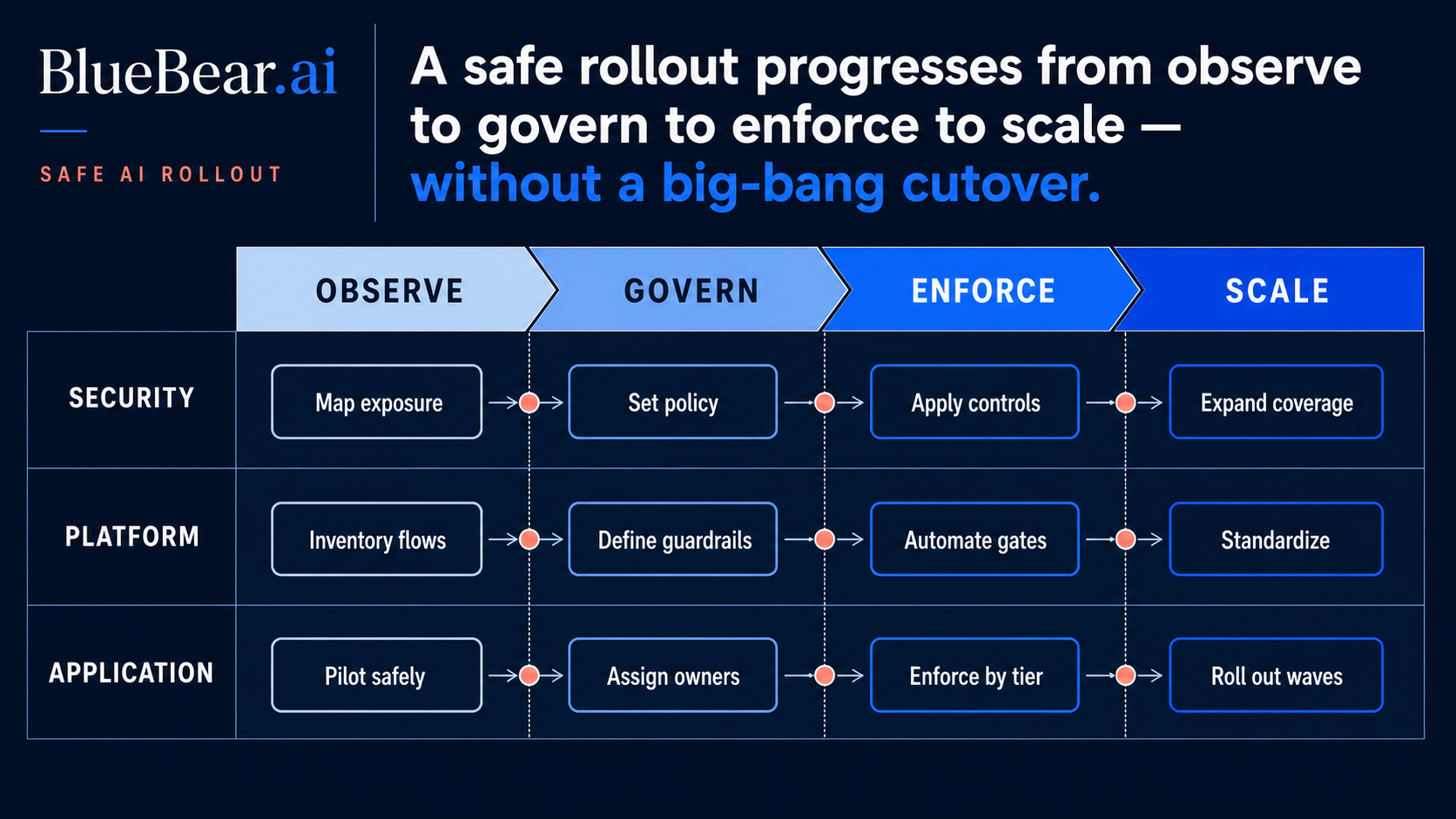
Implementing a new gateway can paralyze operations if existing access breaks or teams try to centralize everything at once.
Security leaders, AI governance leads, and security architects frequently face a critical challenge: integrating new Model Context Protocol (MCP) gateways without disrupting ongoing operations. Enterprise environments are complex. Introducing new infrastructure often means grappling with scattered credentials, logs that lack authorization context, and tool autonomy that outpaces policy coverage. This article outlines a practical, phased rollout plan for an enterprise MCP gateway. It moves from observation to controlled expansion, helping your team build confidence and prove value at each step.
Understanding the Core Problem
A successful MCP gateway rollout is not a "big bang" event. Instead, it is a careful progression. Many initiatives stall when organizations attempt to centralize every tool and integration simultaneously. This approach creates immediate friction. It also makes it difficult to prove that existing access methods will continue to function reliably. Our focus here is on a strategy that minimizes risk while building a strong foundation for governed AI agent operations.
Phase 1: Inventory and Observation
Map Your Current AI Agent Landscape
Before deploying any new technology, understand what you already have. Identify all existing AI agents, the tools they access, and the data they interact with. Document current authorization mechanisms and how credentials are managed. This inventory often reveals that credentials and permissions are scattered across different systems and teams. This makes central oversight nearly impossible.
Analyze Existing Log Data
Review current logging practices for AI agent activity. A common challenge is that logs do not preserve authorization context. They might show an action occurred but lack details on why it was authorized or the specific permissions used. This gap hinders incident response and auditability. Focus on understanding what information is missing and what insights are critical for governance.
Establish a Baseline of Tool Autonomy
Observe how quickly new tools and integrations are adopted by different teams. In many organizations, tool autonomy expands faster than policy coverage. Teams quickly integrate new capabilities, often without a clear understanding of the security implications. This phase aims to quantify that speed and identify areas where policy gaps are most pronounced. This observation becomes your baseline for measuring improvement.
Phase 2: Identity and Audience Validation
Centralizing Agent Identities
With an inventory complete, the next step is to centralize how AI agents are identified. Implement a clear strategy for assigning unique identities to each agent. This is crucial for tracking activity and applying consistent access policies.
Validating the Agent's Audience
Determine what resources each agent is *intended* to access. This "audience validation" goes beyond simple authentication. It confirms that an agent is authorized to interact with a specific tool or data set, under defined conditions. The Model Context Protocol (MCP) architecture helps here by assigning hosts responsibility for connection permissions and authorization decisions. It also handles policy enforcement and isolation, while servers expose focused resources, prompts, and tools Architecture - Model Context Protocol. This clear separation of duties enhances security.
Phase 3: Policy and Approvals
Developing Granular Access Policies
Based on your validated agent identities and audiences, develop granular access policies. These policies should define exactly what actions each agent can take on specific tools and data. Focus on "least privilege" principles, granting only the necessary permissions for an agent to perform its function. Explicitly address the pain point of scattered credentials by consolidating policy enforcement.
Implementing Approval Workflows
For high-impact or sensitive agent actions, implement formal approval workflows. These workflows ensure human oversight where needed. They also create an auditable trail for every decision. This directly addresses the challenge of logs not preserving authorization context. Each approval becomes a documented part of the authorization record.
Phase 4: Controlled Expansion
Starting Small: The BlueBear Approach
Rather than a complete overhaul, adopt a controlled expansion strategy. BlueBear’s MCP gateway can begin as an evidence and control layer around selected high-value integrations. This means you don't need to govern every agent or tool from day one. Instead, pick a critical integration or a specific agent workflow to start. This approach delivers immediate, demonstrable value without overwhelming your team.
Distinguishing the BlueBear Difference
The BlueBear MCP gateway differs from traditional approaches by focusing on a phased, evidence-led implementation. Many solutions demand a full-scale deployment, creating a "rip and replace" scenario. BlueBear operates as a governed agent runtime, allowing you to gradually introduce controls and gather evidence of agent behavior. It positions the MCP gateway as a strategic layer for insights and control, not merely an enforcement point.
MCP security guidance, which BlueBear adheres to, explicitly forbids token passthrough. It also recommends validating that tokens are issued specifically for the receiving MCP server Security Best Practices - Model Context Protocol. This prevents privilege escalation and reinforces the principle of least privilege.
Practical Diagnostic Checklist for Phased Rollout
Use this checklist to guide your initial BlueBear MCP gateway implementation:
- Identify one critical AI agent workflow: Choose a workflow with high business value or security sensitivity.
- List all tools used by that workflow: Document every external service or API the agent accesses.
- Define the explicit permissions required for each tool: Detail the minimum access necessary.
- Identify the workflow owner: Assign clear responsibility for agent governance.
- Determine required audit trails: Specify what information must be logged for compliance and security reviews.
- Establish an approval process for sensitive actions: Outline when human intervention is necessary.
Scaling Gradually with Evidence
Once your initial BlueBear MCP gateway deployment is stable and proving value, expand its scope. Add more agents, tools, and integrations incrementally. Each expansion should be driven by evidence gathered from your initial phases. This ensures that policy coverage keeps pace with, or even outpaces, tool autonomy. This iterative approach minimizes disruption and maximizes confidence among stakeholders.
Conclusion
Deploying an enterprise MCP gateway is a strategic initiative. It addresses critical pain points like scattered credentials, missing authorization context in logs, and uncontrolled tool autonomy. A phased rollout, starting with inventory and observation, and moving through identity, policy, and controlled expansion, is the most effective path. The BlueBear approach allows organizations to build an evidence and control layer incrementally around high-value integrations, rather than attempting a risky, all-at-once deployment.
To begin securing your AI agent operations and to avoid rollout delays, choose one agent, two tools, and one owner for the first governed MCP path. Evaluate the current workflow before adding another tool. This practical first step will provide immediate insight and control.
Questions people actually search for
- how do you roll out an enterprise mcp gateway
Inventory existing connections, choose one bounded workflow, observe traffic without changing execution, enforce read-only policy first, add approvals for consequential actions, canary a limited population, and expand only after denial and recovery tests pass.
- which tools should move behind an mcp gateway first
Start with a useful, well-owned workflow whose operations and side effects are understood. Prefer read-heavy tools with clear identities and rollback paths before payment, access-control, deletion, or broad administrative operations.
- should an mcp gateway fail open or fail closed
Fail closed for actions that require authorization, approval, credential resolution, or retained evidence. A separately approved degraded read path may be reasonable, but silent bypass removes the exact control the gateway was introduced to provide.
- how do you measure an mcp gateway rollout
Track allowed and denied operations, policy latency, tool success, ambiguous side effects, approval completion, evidence completeness, retries, affected workflows, and recovery time. Volume alone does not show whether the gateway is governing safely.