Disclosure: BlueBear builds an AI agent platform that records some of what is described below, so we have a commercial interest. Most of this article says you can do it with tooling you already have, which is true and is the reason to read it before a purchase.
The short answer: five things, and step count is the one you are missing
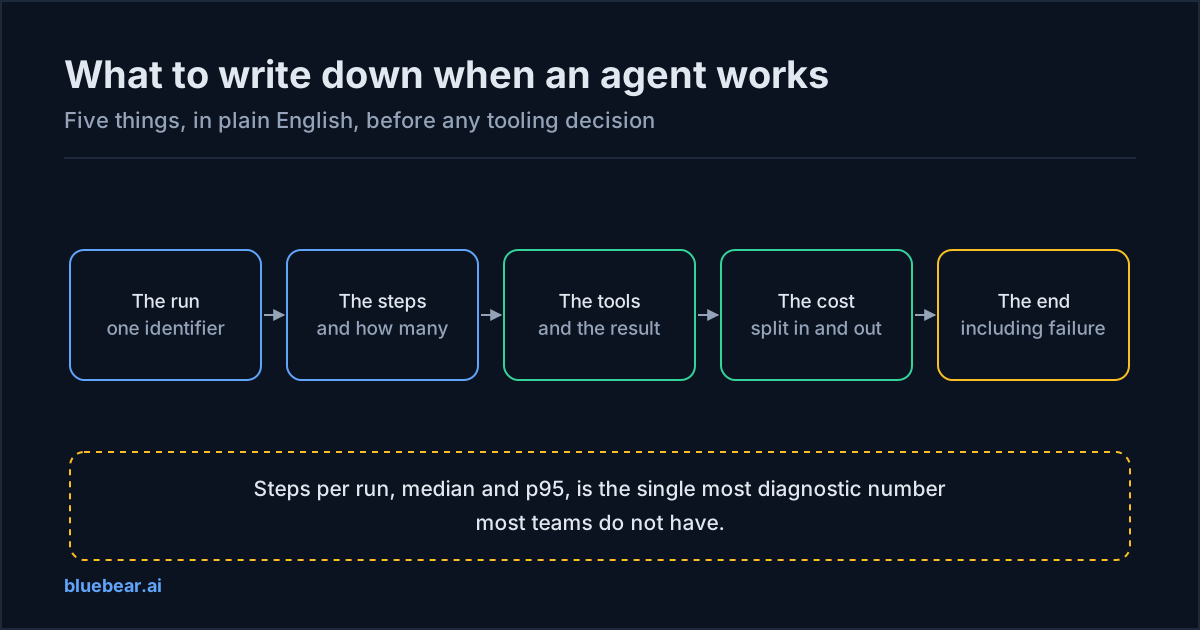
Before choosing tooling, decide what is worth recording. Five things answer almost every question anyone will ask you about an agent in production.
| # | Record | The question it answers | Effort |
|---|---|---|---|
| 1 | A run identifier, attached when the request arrives | Which calls belonged to the same user action? | A day. Everything else depends on it. |
| 2 | Steps per run — how many, and which | Why is it slow / expensive / wandering? | Low, and disproportionately valuable |
| 3 | Tool calls — what, against what, and the result | What did it actually touch? | Low if there is a tool layer; high if there is not |
| 4 | Cost, split into input and output tokens | Where did the money go? | Low. The split is what makes it diagnostic. |
| 5 | How it ended, including failures | Did it work, and if not, why? | Low to record, and the most commonly missing |
If you already run distributed tracing — the practice of recording each step of a request as it moves through your systems, so the whole journey can be reassembled — then items 1, 3 and 4 are largely configuration. Items 2 and 5 usually need a deliberate decision.
1. A run identifier: the cheapest change with the largest effect
One user action becomes many calls. A single request to an agent can produce a planning call, several tool calls, a summarisation, a retry and a final response. Without a shared identifier tying them together, you have a pile of records about the same event and no way to assemble it — reconstruction means correlating timestamps, which works until two runs overlap, which in any concurrent system is immediately.
Two properties matter. Mint it when the request is admitted, not inside the agent, because an agent that mints its own identifier can also fail to on the runs that went wrong. And carry it on everything, including the cost records — attribution attached later is attribution you do not have.
2. Steps per run: the number most teams do not have
This is the single most diagnostic measurement in agent operations and it is missing from most systems, because ordinary software does not have a variable step count and nobody thought to record one.
Record the median and the ninety-fifth percentile. The gap between them is the interesting part: if the median is four and the ninety-fifth percentile is twenty, a minority of hard inputs is consuming most of your time and money, which is a targeting problem rather than a model problem.
Step count explains three separate symptoms that otherwise look like three separate problems. Slowness — an agent taking eight steps where it took four is twice as slow with no model change. Cost — each step re-sends the accumulated conversation, so input tokens grow faster than step count does. And quality drift — an agent that has started wandering is usually visible in step count before it is visible in output. One request, many model calls takes the cost consequence apart properly.
3. Tool calls: what it actually touched
For each tool call: which tool, which target, the arguments in a form you are willing to retain, the result, and the duration.
The retention question is real and worth deciding deliberately rather than by default. Tool arguments frequently contain personal or confidential data, so the sensible default is to record identifiers and hashes rather than content, and to retain content only where something specifically requires it. GenAI telemetry without leaking prompts, tool arguments or customer data is the existing deep dive on the trade-off.
How easy this is depends entirely on your architecture. If tool calls go through a single layer, it is one place to instrument. If each agent calls its APIs directly, it is as many places as there are agents — which is one of the quieter arguments for having a boundary at all.
4. Cost, split into input and output
A single cost number tells you the size of a problem. The split tells you what kind of problem it is.
Input tokens rising while output stays flat means context is accumulating or a cache stopped working. Output rising sharply means generation length changed. Both rising proportionally means more steps. Neither changing while spend rises means failed and retried work — which is the most common cause and the hardest to see. Why AI agent costs spike works through the diagnosis.
One implementation note worth stealing: record the cost with the run identifier and the customer or team it belongs to, at the time of the call. A provider invoice knows an API key, not a workflow, so attribution cannot be reconstructed afterwards at any price.
5. How it ended — and the field nobody writes
Every run should record an ending: completed, failed, timed out, cancelled, abandoned at a step limit. And when it failed, why.
This is the most commonly missing item and it is worth explaining why with a real example rather than an exhortation. In our own gateway the session record has a status — with documented values covering created, running, ended, failed and killed — and a column for the error that ended it. In our production database that error column is populated in none of the error rows. The sessions are correctly marked failed; the field that would say why is empty.
The schema is right. The producer never writes it. That specific shape of gap — a correct field with no writer — is extremely common, costs nothing to create, and is only discovered during an incident when it is expensive. It is worth auditing for in your own system deliberately: pick your three most important records and check whether each field is actually populated in production, rather than whether it exists.
What not to record, at least at first
Two temptations worth resisting while you are getting the five above in place.
Full prompts and responses, by default. They are large, they frequently contain personal data, and retaining them converts an operational tool into a data-protection obligation. Store references and hashes; retain content only where something requires it and a retention period bounds it.
Everything, at full fidelity, forever. Telemetry is correctly sampled. That is not a compromise — it is the right engineering decision for a system whose purpose is to help you find bugs. It is, however, exactly why telemetry cannot serve as your audit record, which needs completeness rather than volume. Observability vs. audit trail covers why these are two different jobs with two different stores.
If you operate in a regulated industry
Keep the two apart from the start. Telemetry is sampled and short-lived; the authority record is complete and long-lived. Trying to make one store do both produces something too expensive to keep and too incomplete to rely on. What an audit trail must capture is the specification for the second one.
If you are a platform or engineering lead
Do items 1 and 2 this week against the tooling you already run — they are a day of work and they change what every subsequent conversation is based on. Then read AI agent observability with OpenTelemetry, which is the technical treatment of how to express all five in a standard shape.
If you resell this to customers
Add the customer identifier to items 1 and 4. Without it your cost is blended, which means you cannot tell which account is destroying your margin until it is a renewal conversation. White-label brand workspaces explained covers the arithmetic.
Do this next
Measure steps per run for one agent, median and ninety-fifth percentile. If you cannot, that is the first thing to instrument, and it is a day. The number is usually higher than the team guesses, and it reframes the cost and latency conversation immediately. Then read observability vs. audit trail before deciding this covers your compliance obligation, because it does not.
Questions people actually search for
- what should you trace in an ai agent
Five things cover almost every question you will be asked. A run identifier tying every call in one user action together. The steps - how many the agent took, and which. The tools - what it called, against what, and whether it worked. The cost, split into input and output tokens rather than a single number. And how the run ended, including the failures. Everything else is elaboration, and the second one is the one most teams do not have.
- opentelemetry agent tracing
OpenTelemetry is an open standard for recording what a piece of software did as it ran, and it now has conventions specifically for AI calls - agreed field names for the model, the tokens, and the operation. Using it for agents means each model call and each tool call becomes a span inside one trace for the whole run. The value is that the field names are shared, so tooling can read your data without you inventing a format. It does not, by itself, record who was allowed to do something.
- how do you monitor an ai agent in production
Watch four things and resist watching more at first: steps per run at median and ninety-fifth percentile, the failure and retry rate, cost per run, and the rate of human corrections. The first tells you when the agent is wandering, the second when something upstream is broken, the third when a change was expensive, and the fourth when quality has moved. Notice that only the fourth requires anything outside your infrastructure, and it is the one that matters most.
- why is my ai agent slow
Usually step count rather than model latency, and the two look identical from outside. An agent that takes eight steps where it used to take four is twice as slow with no model change at all. Record steps per run before you start optimising individual calls, because tuning a model that is called eight times when it should be called four times is solving the wrong problem. Retrieval size and tool latency are the next two places to look.
- do I need a special tool to trace ai agents
Not to start. If you already run distributed tracing, the highest-value change is attaching a run identifier at the point a request is admitted and recording steps per run - both of which are a day of work against tooling you already have. Specialist tools become worthwhile when you want prompt-level inspection, evaluation of output quality, or comparison across model versions, which are genuinely different jobs from tracing.