The problem
You own a property management company with 400 units. Six months ago you added an AI helper. It drafts late-rent notices, looks up local rules, and answers routine tenant questions. It saves your office manager hours a week.
Then a tenant disputes a notice. She says it quoted the wrong late fee. Your office manager finds a copy of the notice, but nothing says why the helper wrote that number or where it got the rule. The vendor sends you a screenshot of their dashboard. It shows a green check mark.
The same week your bookkeeper asks about the AI line on the bill. It is $1,840 this month, up from $900. Which building was that for? Which tasks? Nobody can say.
That is the problem in one sentence. When an AI helper does work, you cannot prove what it did or what it cost. You have a green check mark and a lump sum.
Why this keeps happening
Every AI seller shows you two things: star reviews and a dashboard. Neither one is proof.
A star review is other people's opinion about the past. It tells you whether to take a look. It says nothing about the notice your helper sent on Tuesday. Directories of AI tools grade things too. As of September 2026, one large directory, Glama, gives the tools it lists a grade from A to F for code health. That is useful for picking a tool. It is useless in a dispute.
A dashboard is the seller's own record, on the seller's own website. The seller can change it. When the seller goes out of business, it goes with them. And it shows only what the seller chose to show.
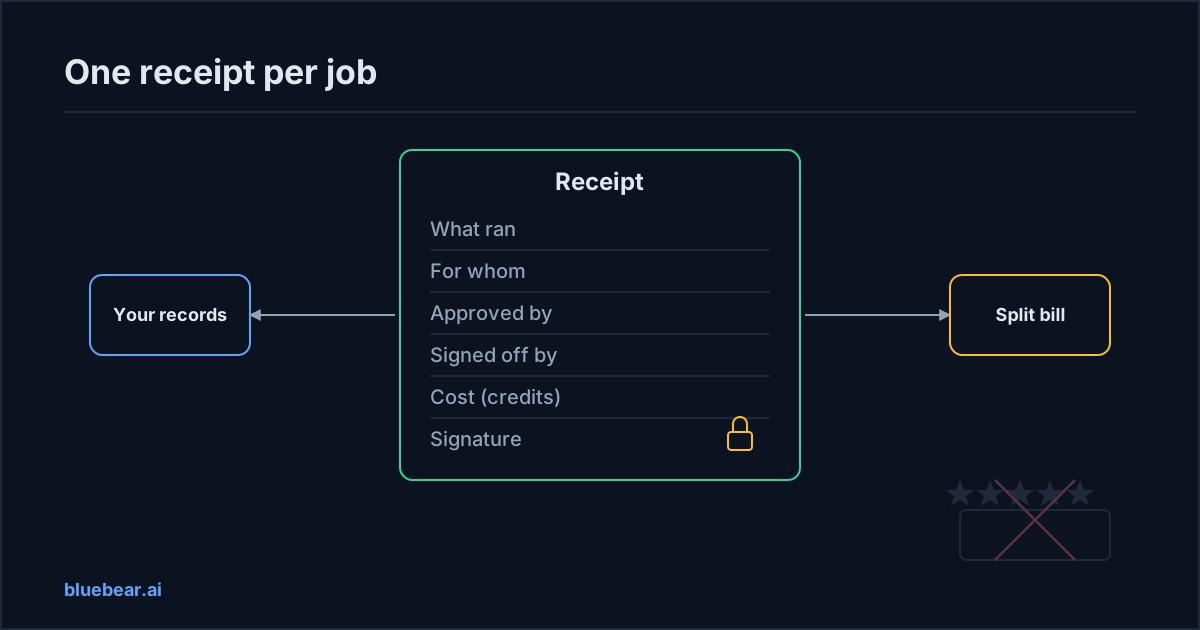
What you actually need is closer to a receipt from a contractor. Who did the work, for whom, what exactly, when, and what it cost. Signed, so it cannot be edited later. Kept by you, not by them.
The people who write the rules for trustworthy AI say the same thing in fewer words. You cannot hold anyone to account for a job you cannot see.
"Trustworthy AI depends upon accountability. Accountability presupposes transparency."
Security experts agree. As of December 2025, OWASP's guide to AI agent risks says that without clear visibility into what agents are doing, and which tools they are calling, their reach quietly grows. A record per job is how you keep that visibility.
| Star reviews | Seller dashboard | Signed receipt | |
|---|---|---|---|
| Who makes it | Other buyers | The seller | The platform that counted the job |
| What it covers | The past, in general | Whatever the seller shows | One job, done for you |
| Can you check it | No | Only by trusting the seller | Yes, from the signature |
| Can it change later | All the time | Easily | No |
| Good for | Making a shortlist | Day-to-day monitoring | Disputes, bills, audits |
The cost of not having receipts shows up three ways. You lose disputes you should win. You cannot split the AI bill across buildings, clients or departments. And when a customer or an auditor asks "what did the AI do here", you have nothing to hand them.
How to fix it
You can start fixing this month, whatever tools you use. People search for "what's the best way to create an evidence trail for ai governance". The plain answer is below.
- Ask every AI seller for a per-job record. Not a monthly summary. One record per task, showing what ran, when, for whom and the cost. If they cannot produce one, note that before you renew.
- Make the record land in your files, not theirs. Export it, email it, or have it written to a folder you own. The test is simple. If the seller vanished tomorrow, would you still have it?
- Insist that the record cannot be edited after the fact. A signed or locked record beats a spreadsheet the seller can quietly fix.
- Tag each job to a customer, building or department. That is how you split the bill. The cost allocation guide shows how to do this without a finance team.
- Record who approved the risky ones. If a person signed off before the helper sent a notice, the record should name them.
- Once a month, read the records against the bill. Thirty minutes. You will catch the surprises while they are small.
Big companies get this record a different way. As of February 2026, the law firm Mayer Brown advises buyers to write a right to audit an AI agent's decision logs into the contract. That works if you have lawyers and leverage. Most owners have neither, so ask for the record up front instead of negotiating for it later.
Engineers call the result an ai audit trail, or an ai agent audit log. If you want the fuller version, the plain guide to AI agent audit trails explains what one must contain. For an owner, the short version is enough. A receipt for every job, kept with your other records.
What BlueBear's marketplace does about it
On BlueBear's marketplace, every job produces a receipt, and the platform writes it, not the seller. The marketplace is a pilot today, with invite-only publishing, and BlueBear lists each service on the seller's behalf. Here is what the receipt does for you.
It says what ran, for whom, and what it cost. Each receipt names your company, the workspace and the person on whose behalf the job ran. It names the service and the exact version used. It records a fingerprint of what was asked, without storing your data in the receipt itself. And it states the cost in credits, where one credit is one US dollar.
It says who approved it and who signed off. If a person had to approve the job first, the receipt records that. If a named reviewer checked the result, fixed it or released it, their name is on the receipt too. If the reviewer rejected the result, you were refunded, and the refund is recorded against the original charge.
It cannot be changed, and you keep it. The receipt is signed by the platform at the moment the job ran. Nothing can be added to it later. You can hand it to a tenant, a customer or an auditor, and none of them needs an account with the seller to check it. This is what people mean when they search for verifiable ai receipts.
It splits your bill for you. Because every receipt is tied to a workspace, you can see what one building or one client spent this month. For example, a lookup priced at 0.20 credits and used 400 times shows up as 80 credits, or 80 US dollars, against the workspaces that used it. No estimate, no spreadsheet.
One honest limit. A receipt proves a job happened, on whose authority, at what cost. It does not by itself prove the answer was right. Being right comes from the automatic checks the service ran and from the named person who signed off. For low-stakes lookups, the plain receipt is enough. For anything you would not let a new hire send unchecked, buy services that include a reviewer.
During the pilot, sellers are paid by hand and there is no league table of services. Neither affects the receipt you get.
What to do next
Pull up the last AI bill you paid. Try to answer three questions from your own records. What jobs was it for? Who approved the risky ones? Which customers should carry the cost? If you cannot answer, that gap is the thing to fix before you add another AI helper.
The evidence chain guide explains how receipts join up with the approvals and results around them, so the whole story of a job hangs together. Then read how a service reaches your systems without holding your password, in the guide to controlling vendor access. To see what a listing with receipts looks like, open the public marketplace.
Questions people actually search for
- how do i prove what an ai helper did
Get a record for every job, not a monthly summary. It should show what ran, when, for whom, what it cost, and who approved or checked it. Make sure it lands in your own files and cannot be edited later. On BlueBear's marketplace the platform writes a signed receipt for each job, so you can show a tenant, a customer or an auditor without asking the seller.
- are star reviews the same as a receipt
No. A star review is other people's opinion about the past, and it helps you make a shortlist. A receipt is proof of one job done for you, at a known cost, that cannot change afterwards. You need reviews once, when choosing. You need a receipt every time, for disputes, bills and audits. A seller's dashboard sits in between and is only as reliable as the seller.
- how do i split an ai bill between customers
Tag every job to a customer, building or department at the time it runs, then add up the receipts. On BlueBear's marketplace each receipt is tied to a workspace and states the cost in credits, one credit being one US dollar. Summing receipts per workspace gives you the split without a spreadsheet, and refunds for rejected results are recorded against the original charge.
- what is an ai agent audit log for owners
It is the file of records that shows what your AI helpers did, on whose say-so, and with what result. For an owner, think of it as a receipt for every job, kept with your other records. It must be written at the time of the job, not rebuilt later, and it must not be editable. Marketplace receipts are one kind of entry in that file, covering work done by services you bought.