The problem
You run a marketing agency with 30 staff. Your AI helper does campaign research. It could do more if it were allowed to buy small things on its own. A property records lookup for 20 cents. A verified business address for a dollar. A competitor price check for two.
Your team asks you to let it. You say no. Not because the lookups are expensive, but because you have seen a cloud bill go from $200 to $4,000 in one month, and nobody could explain why. You are not putting a robot near a company card.
So the helper stops halfway through the job and waits for a person. Your staff do the lookups by hand. The whole point of the helper was to stop that.
That is the problem. Your AI helpers could buy small services on their own, but you are afraid of an open-ended bill. You want a boundary you set once, proof of every purchase, and a way to loosen the boundary when the proof earns it.
Why this keeps happening
The tools for letting a machine pay for things have arrived. The tools for telling it how much it may spend have not caught up. Most of what you read about agentic commerce is about the payment part, and only the payment part.
As of September 2026 there are several ways for an AI helper to pay a seller. One, called x402, uses an old web signal that means "payment required": the seller names a price and the helper pays for that one request. It now sits under the Linux Foundation. Stripe has published its own Machine Payments Protocol. Google's Agents to Payments protocol was handed to the FIDO Alliance. Mastercard launched Agent Pay for Machines in June 2026. Reporting in July 2026 put x402 at 169 million payments in its first year.
If you have searched what is x402, or x402 vs stripe mpp, here is the plain answer. Both move money from your helper to a seller. Neither one sets your budget. Every "agent payments protocol explained" post covers how a payment happens. None of them answers the questions an owner asks.
| Your question | A payment method | A budget with rules |
|---|---|---|
| How does the helper pay for this one job? | Yes, that is what it does | From credits you bought in advance |
| Is this helper allowed to buy this at all? | No | Yes, checked before anything is spent |
| What is the most it may spend per job, and per month? | No | Yes, set by you |
| Who approved a purchase above the limit? | No | Yes, a named person, on record |
| Where is the proof of what was bought? | A payment record, at best | A receipt for every job |
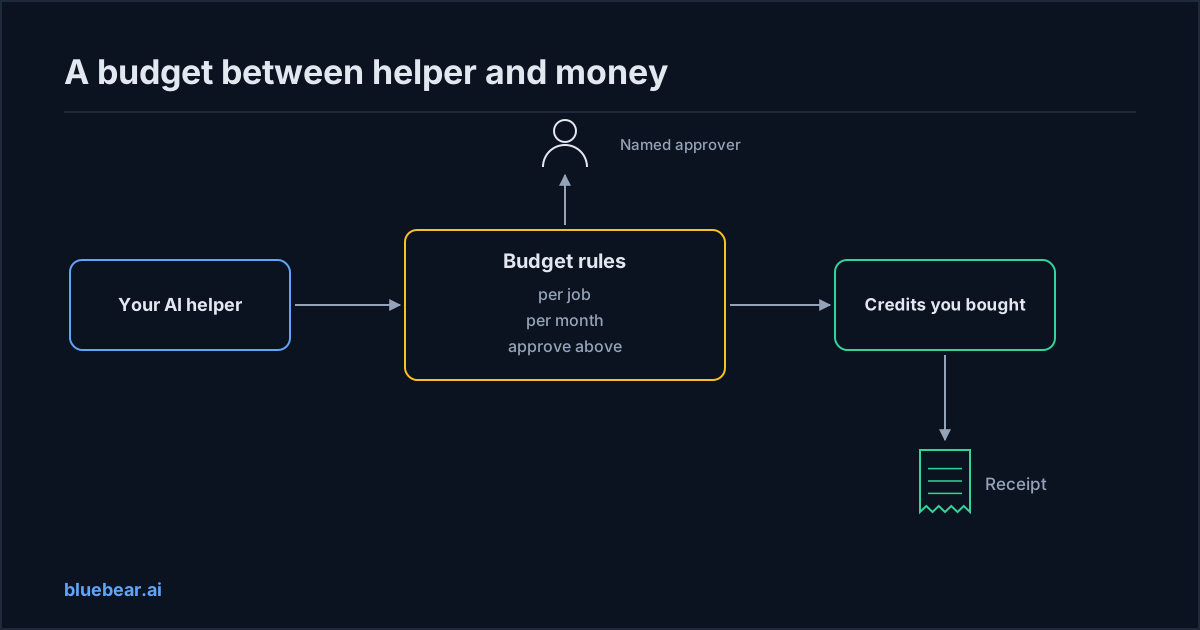
A card with no limit is what you are afraid of, and rightly so. The fix is not a better card. It is a budget with rules, sitting between the helper and the money.
Security experts describe the exact failure. As of December 2025, OWASP's guide to AI agent risks gives this example. A buying agent gets approval at the start. The spending limit is cut hours later. The agent completes the purchase anyway on the old permission. The same guide recommends spending ceilings that cut the agent off automatically when it goes over. Check the budget on every purchase, not once at setup.
How to fix it
You can set ai agent spending limits with any tool that supports them, and you can approximate them by hand where it does not. Start with one helper and one kind of purchase.
- Pick one place where a wrong purchase is cheap and reversible. Public records lookups are a good start. Anything that changes a customer's account is not.
- Set three numbers. The most any single job may cost. The most the helper may spend in a month. The amount above which a person must say yes first. Write them down.
- Set the boundary. Which kinds of services the helper may buy, and from which sellers. Everything else is off the table, whatever the helper is asked to do.
- Name the approver. One person, not a mailbox. Approving a purchase is a five-second decision if the request shows the price and the reason. The guide to human approval for AI helpers explains why approving spend beats approving the helper once at setup.
- Keep the helper away from the money itself. It should never hold a card number or a login to your bank. It should hold permission to spend within the rules, and nothing more.
- Read a month of purchases against the rules. Did every job stay under the per-job limit? Did every purchase above the threshold name an approver? Were wrong results refunded? Then widen one number at a time.
The companies building the payment side say the same thing about control.
"Machine-to-machine payments only work if agent actions are secure, auditable, and policy-controlled."
Secure means the helper never holds the card. Auditable means a receipt. Policy-controlled means your three numbers.
For example, in credits where one credit is one US dollar: no more than 1 credit per job, 50 credits a month, and a person approves anything above 0.50. Those numbers are only an illustration. The shape is what matters. The per-job limit protects you from one expensive mistake. The monthly cap protects you from a thousand cheap ones. The authorization policy guide shows how your IT team can write this down as a rule the system enforces.
What BlueBear's marketplace does about it
On BlueBear's marketplace, the budget sits between your helper and the money, and the platform enforces it. The marketplace is a pilot today. Publishing is by invitation, and BlueBear lists each service on the seller's behalf. Here is what the pilot does for you.
Your helper spends credits you bought, never a card. You buy credits in advance, one credit for one US dollar. Jobs draw down against them. There is no card number for the helper to hold and no open-ended bill at month end.
During the pilot, your helper can shop within your rules. Your helper connects to the marketplace through one address and can do four things. Look for a service that fits. Read its price and terms. Ask to use it. Run it. The asking step is where your budget is checked, on every request. If the service fits your limits and your boundary, the helper gets a short-lived permission to run it. If it does not, the helper gets a link for a named person to approve, and nothing is spent until they do.
A named person decides anything above your line. The approval is recorded with the person's name. If someone tricks your helper into trying to buy something outside the rules, it simply gets the approval link instead of the purchase.
A receipt for every job, kept with your other records. Every job produces a signed receipt: which service ran, which version, on whose behalf, whether approval was needed, and what it cost. If you already keep an audit trail for your AI helpers, that receipt is one more entry in it, covering money spent. The receipts explainer shows each line. Reviewing a month of receipts against your rules is how you decide whether to widen them.
Wrong results are refunded. Where a result needs judgment, a named reviewer checks it, fixes it or releases it. If they reject it, the credits come back, and the refund is on the receipt.
Some payment designs aim to remove accounts entirely, so a helper pays per request with no sign-up at all. That is convenient for a seller. For you, the account is the point. It is where the limits, the approver and the receipts live.
What the pilot does not do: there is no league table of services and no automatic choice between rival sellers. Sellers are paid by hand. The list of services is short, because the first ones come from paid projects rather than open sign-ups. Read what exists before you plan a category around it.
What to do next
Write down three numbers and one boundary for one helper this week. Per job, per month, approve above, and which kinds of services. Then decide who the approver is. Lawyers now put the third number in the contract itself.
"What is the exact threshold where the agentic AI solution must stop and ask a human for approval?"
Open the public marketplace to see what your helper could buy under those rules today, and read a service page before you set the numbers. Want to set up one budgeted workspace and connect your own helper during the pilot? Contact BlueBear and say which kind of service and which numbers you have in mind.
Questions people actually search for
- can my ai helper spend money on its own
Yes, inside rules you set. Give it a limit per job, a limit per month, and a line above which a named person must approve. Restrict which kinds of services and which sellers it may use. The helper should never hold a card or a bank login, only permission to spend within those rules. On BlueBear's marketplace during the pilot, the platform checks your limits on every request before anything is spent.
- how do ai agent spending limits work
Three numbers do most of the work. A per-job limit stops one expensive mistake. A monthly cap stops a thousand cheap ones. An approval line sends anything above it to a named person before the purchase happens. Add a boundary for which services and sellers are allowed at all. Start small on something reversible, read a month of receipts against the rules, then widen one number at a time.
- what is x402 in plain terms
It is a way for a machine to pay for one web request. The seller answers with "payment required" and a price, and the helper pays, then gets the result. It moves money; it does not say whether your helper was allowed to buy, within what budget, or who approved it, and it leaves no receipt tied to your company. Budget rules are a separate layer that sits above any payment method.
- what happens when my ai helper hits its budget
It stops buying and asks. On BlueBear's marketplace during the pilot, a request that falls outside your limits or your boundary is not paid. Instead the helper receives a link for a named person to approve, and nothing is spent until they do. When the monthly cap is reached, purchases pause until the next month or until you raise the cap. Every purchase that did go through has a signed receipt.